

Why AI research assistants matter for busy AI professionals
In 2026, the world of artificial intelligence changes incredibly fast. New AI models and discoveries pop up almost every day. For people who work with AI, like leaders, developers, or investors, it can feel like trying to drink from a firehose.

There’s just too much information to keep up with, and not enough time in the day. This problem, called information overload, makes it hard to find the important bits and make smart choices.
Imagine needing to understand a complex new AI breakthrough or research paper quickly. Reading through long, technical documents takes hours. This is where an AI-powered research assistant becomes a huge help. These special AI tools are designed to sort through mountains of data, summarize key points, and find important facts for you. They help cut through the noise so you can focus on what really matters for your work.
An ai powered research assistant can save you precious time and lower the chances of making mistakes because you missed vital information. It helps you stay current without getting lost in endless articles and reports.
In this guide, we’ll show you how to pick the best ai-powered research assistant for your needs. We’ll also cover how to check if it’s truly good and how to use it smoothly in your daily ai work. You’ll learn how to make these ai tools a key part of your team, helping you stay ahead in the fast-paced world of AI.
To stay even more informed about the quick changes in AI, consider getting clear daily AI updates from The AI Newsletter Worth Reading.
These kinds of updates, along with smart AI assistance, can really give you an edge. Many businesses are already seeing a big jump in how much they can get done by using Best AI Tools for Businesses That Deliver a Real Productivity Advantage in 2026.
What exactly is an AI-powered research assistant?
An AI-powered research assistant is a smart computer program that uses artificial intelligence to help you find, understand, and use information much faster. Think of it as a super-smart helper that can read and process huge amounts of text and data.

Its main goal is to make your research work easier and save you a lot of time.
These helpful AI tools can do many things. For example, they are very good at summarizing long articles or research papers, pulling out the most important ideas so you don’t have to read every single word. This process is often called literature summarization, and it can greatly enhance your academic efficiency by streamlining workflows, as some experts note AI Research Assistant: Streamlining Literature Reviews and Experiment Planning.
They also excel at citation tracking, which means they can keep tabs on where information comes from, making sure you can always check the original source.
Another key feature is query-based synthesis. This allows you to ask the assistant a question, and it will look through many documents to give you a clear, combined answer based on what it finds. It’s like having a helpful friend who reads many books and then tells you the answer to your specific question. Plus, these assistants are great at source retrieval, meaning they can quickly find other related articles, reports, or data that might be useful for your topic. This helps you get a full picture without manually searching everywhere.
In 2026, you’ll find different kinds of AI-powered research assistants, each built for slightly different tasks:
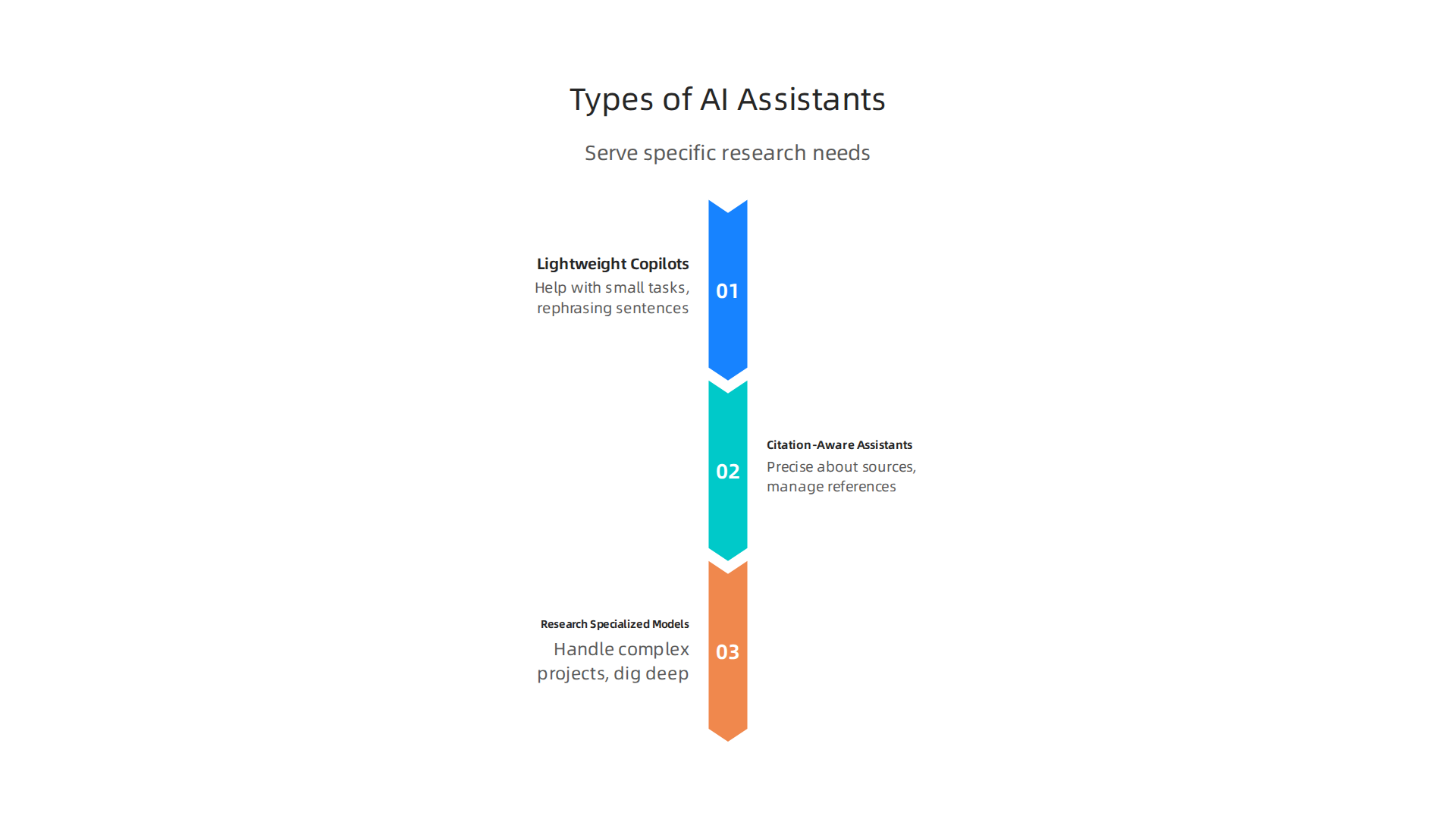
- Lightweight Copilots: These are simpler AI tools that work alongside you as you write or browse. They might help with small tasks like rephrasing sentences or suggesting related terms, acting more like a basic helper.
- Citation-Aware Assistants: These are especially good for students, academics, and anyone who needs to be very precise about their sources. They focus on making sure all facts are linked back to their original papers and help you manage your references. There are many great options for academic research today 6 Best AI Research Assistants for Academic Research in 2026.
- Research-Specialized Models: These are the most powerful AI-powered research assistants. They can handle complex research projects, digging deep into massive datasets to find trends, evaluate ideas, and even help plan experiments. They are often used in scientific or business settings for serious data analysis and in-depth understanding.
Using these advanced AI tools means you can focus more on thinking and creating, and less on the boring parts of gathering information. It’s a great way to improve your daily Human AI Collaboration How To Partner With Artificial Intelligence In 2026 and get more done in your important [ai work].
How AI assistants can cut through information overload
In 2026, the world is full of information. It can feel like trying to drink from a firehose, especially when you’re doing important research or keeping up with new trends in your [ai work]. This is where an ai-powered research assistant truly shines. It helps you manage all that information so you can focus on what really matters.

These smart [ai tools] do more than just summarize. They act like a personal filter, making sure you see the most important stuff and don’t get lost in the noise. Here’s how they help:
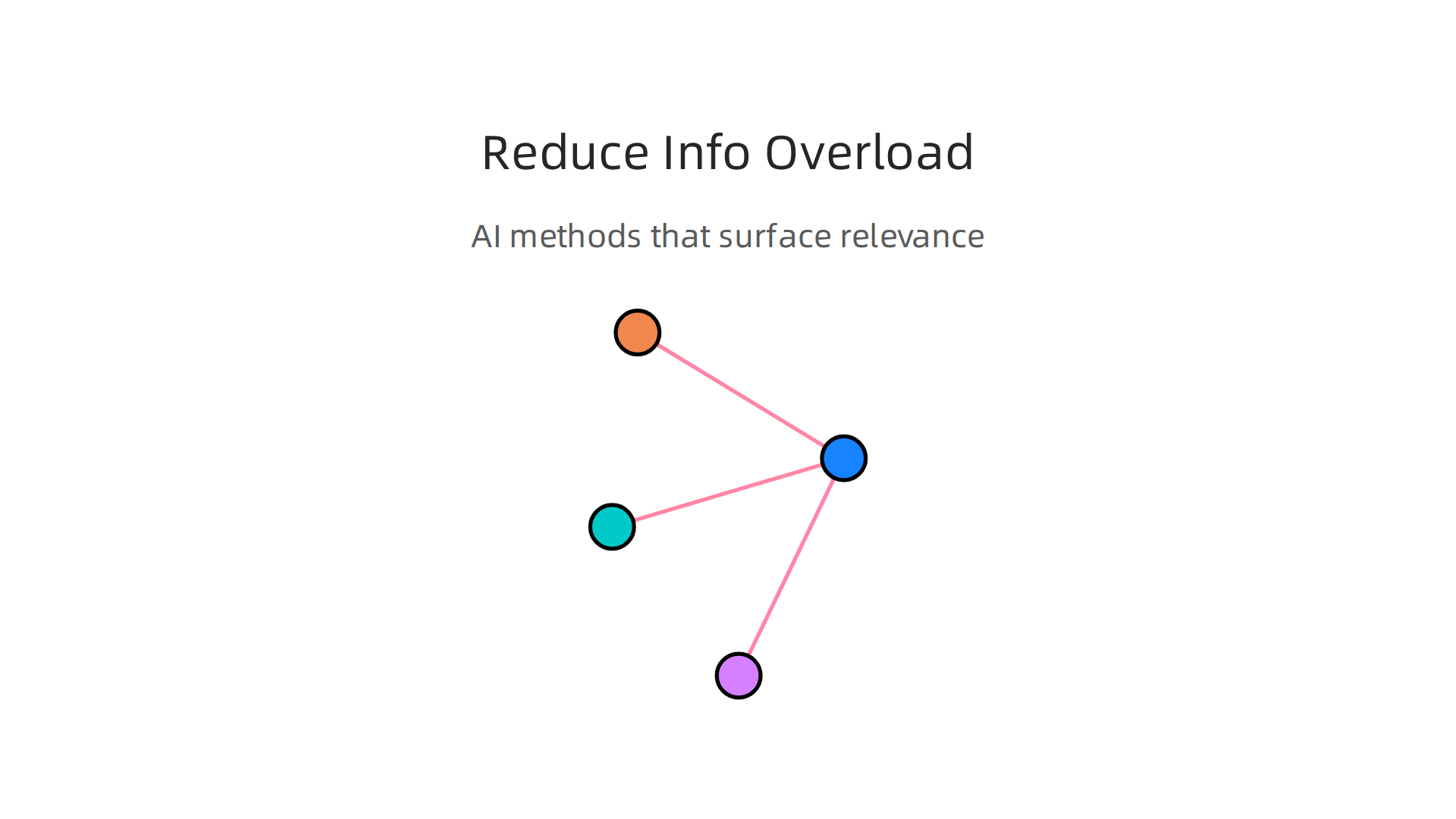
- Prioritized Alerts: Imagine your [ai powered research assistant] reads thousands of articles every day. It learns what you care about most. Then, instead of showing you everything, it only alerts you to the most important new information you need to see. This means you don’t miss key updates in your field.
- Delta-Summaries: Sometimes, you’re already following a topic closely, and you just want to know what’s new since your last check. An AI assistant can give you a "delta-summary." This special summary only tells you about the fresh changes or updates, not everything you already know.
- Trend Extraction: AI tools are also very good at finding big changes or new directions. They can look at lots of information and tell you, "Hey, many new studies are now focusing on this type of [ai work]." This process, called trend extraction, helps you see the big picture and understand where things are heading quickly.
- Long-Term Surveillance: Think of it as having your AI assistant watch over your chosen topics all the time. If something important pops up next week, next month, or even next year, your assistant will let you know. This long-term surveillance means you don’t have to keep checking yourself, saving you a lot of effort.
These automated helpers are excellent at handling the first steps of research. They can quickly give you alerts, help you sort through information (this is called triage), and create short reports (executive summaries). This saves you precious time. However, even with the best [ai powered research assistant], a human touch is still super important. AI can help you find and sort information, but you are the one who truly understands it, checks if it makes sense, and uses it to make smart decisions. Even with all the amazing AI systems in 2026, experts still agree that human review is essential, as shown in the "AI Benchmarks 2026: Top Evaluations and Their Limits" report AI Benchmarks 2026: Top Evaluations and Their Limits. So, AI helps you get rid of the noise, but your brain does the important thinking.
To make the most of these smart [ai tools], it’s helpful to know how to use them effectively. Finding the best AI tools for businesses can really boost your productivity.
If you want to keep up with all the fast changes in AI and get clear daily updates without all the extra searching, consider subscribing to The AI Newsletter Worth Reading.
Evaluating accuracy, bias, and trustworthiness
Even with the best [ai powered research assistant], it’s super important to make sure the information it gives you is right. Just like you’d check a friend’s homework, you need to check your AI’s work to build trust. In 2026, there are key things to look at.
First, let’s talk about the important measures for checking an [ai-powered research assistant]:
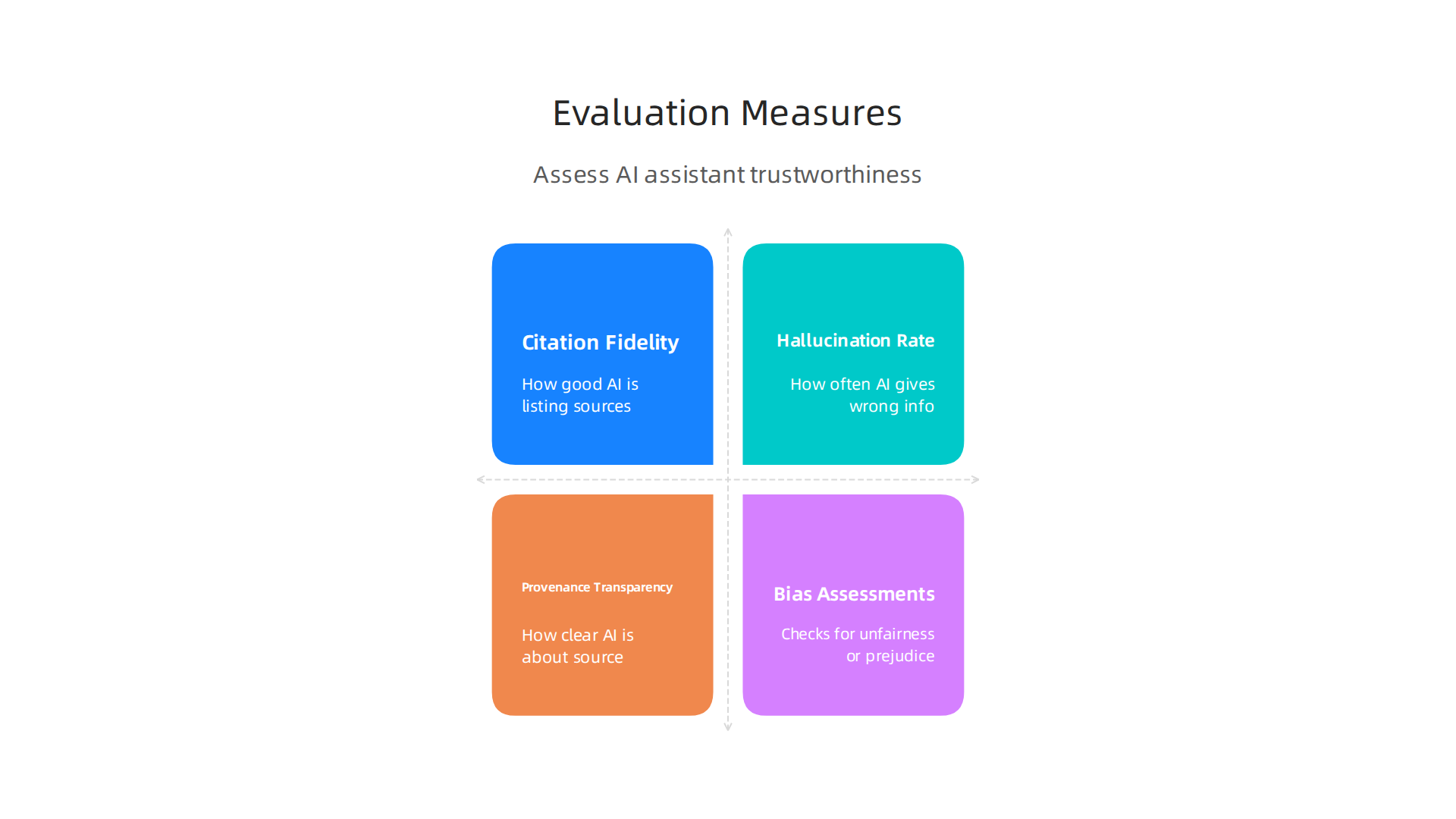
- Citation Fidelity: This is about how good the AI is at finding and listing its sources. Does it tell you where it got its facts? Is the source real and does it actually say what the AI claims? Sometimes, AI tools can "hallucinate." This means they make up facts or even whole sources that don’t exist. This is a big problem because it makes the information unreliable. In 2026, some AI tools still show a hallucination rate of 17-33% for citations, meaning they often make up references or get them wrong How to Prevent AI Citation Hallucinations in 2026: 6 Steps.
- Hallucination Rate: We just mentioned this. It’s how often the AI gives you wrong or made-up information. A low hallucination rate means you can trust your [ai tools] more.
- Provenance Transparency: This sounds fancy, but it just means how clear the AI is about where its information comes from. Does it show you the original documents or websites? Knowing the source helps you check things yourself.
- Bias Assessments: AI systems learn from data. If the data has unfairness or prejudice in it, the AI might also show that unfairness. Checking for bias means looking closely to make sure the [ai powered research assistant] isn’t giving you one-sided views or unfair answers based on things like race, gender, or other groups.
So, how can you, as an executive, practically test these [ai tools] yourself? Here are some simple ways:
- Reproducible Prompt Checks: This means asking the AI the same question more than once. If you ask it "Tell me about X" today and "Tell me about X" tomorrow, do you get mostly the same answer? If the answers are very different each time, it might not be very reliable.
- Red-Team Prompts: Think of a "red team" as a group trying to find weaknesses. You can use this idea to test your AI. Try to trick it or ask it questions in a way that might lead to wrong or biased answers. For example, ask it for information on a tricky topic to see if it stays balanced.
- Spot-Check Sampling: This is like taking a random sample. If your AI assistant summarizes 100 articles, pick a few of them at random and read the original articles yourself. Then, see if the AI’s summary matches what the original article truly says.
By doing these checks, you can get a better feel for how accurate and trustworthy your [ai work] assistant truly is. It helps you partner better with these smart systems to get the best results. You can learn more about how to work well with AI in general by exploring Human AI Collaboration: How to Partner with Artificial Intelligence in 2026. This way, you’re not just taking the AI’s word for it; you’re actively ensuring it’s a helpful and honest partner.
After making sure your AI is accurate and trustworthy, the next big step is to understand how these smart helpers fit into your daily work. An [ai powered research assistant] isn’t meant to just sit on its own. It works best when it plugs right into the tools you already use, making your research flow from start to finish much smoother.
In 2026, many [ai tools] are designed to connect with various platforms. This means your research assistant can talk to other software, helping you move from finding information to making important decisions.
How AI Assistants Connect to Your Workflow
Think of your [ai powered research assistant] as a helpful team member that can share information with others. Here’s how it can link up:
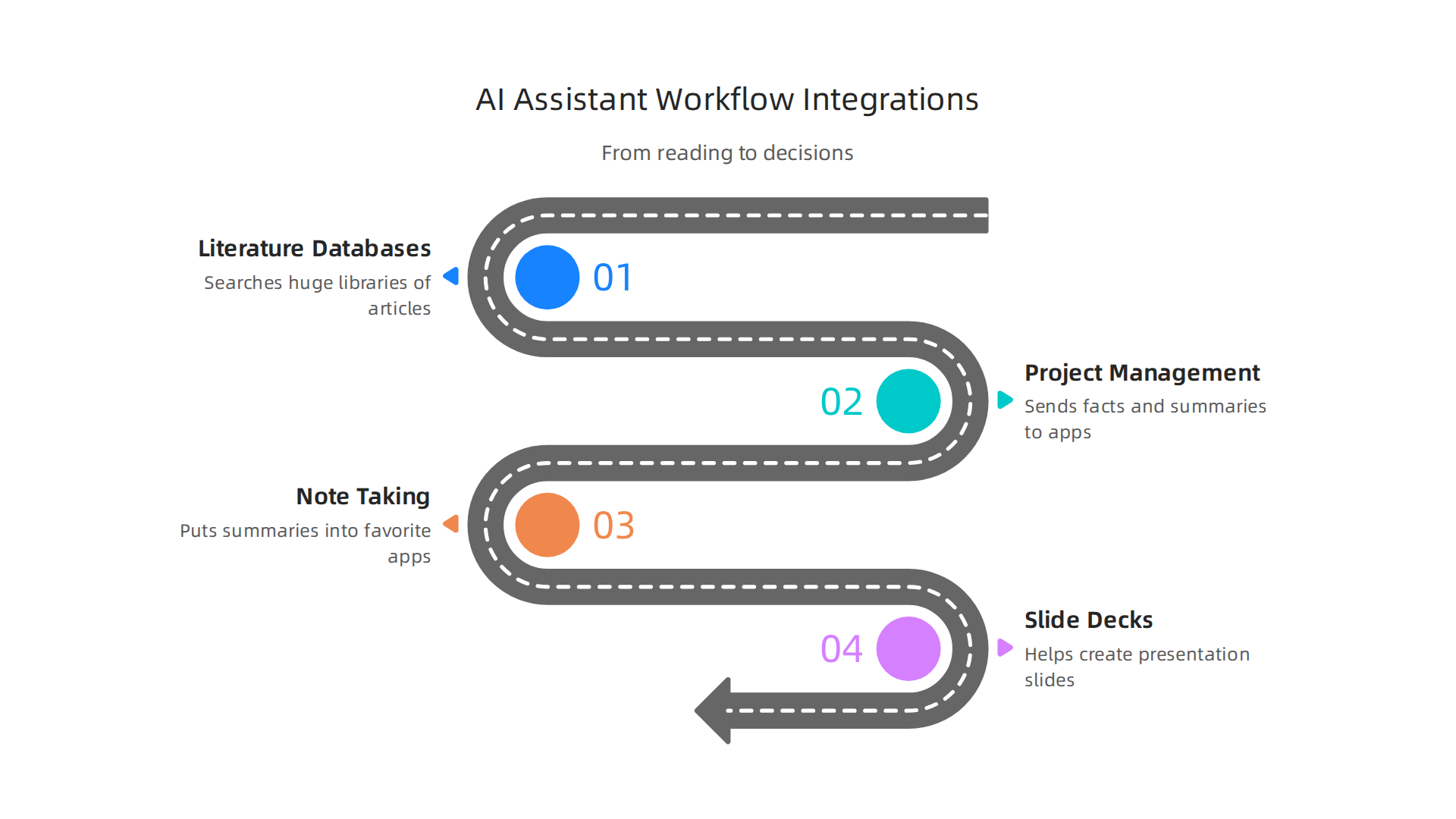
- Literature Databases: Imagine an AI that can search huge libraries of articles for you. It can pull information from places like scientific journals or news archives. Some advanced AI tools, like the Web of Science AI Research Assistant, directly leverage big citation databases.
- Project Management Tools: Once your AI finds key facts, it can sometimes send those facts or summaries straight to your project apps. This helps your team see important insights right where they manage tasks.
- Note-Taking Systems: No more copying and pasting! An [ai-powered research assistant] can put summaries, key points, or even full paragraphs into your favorite note-taking apps. This keeps all your ideas in one place.
- Slide-Deck Generation: For big meetings, your AI can even help create slides. It can take research findings and turn them into bullet points or simple charts for presentations. This saves a lot of time and makes putting together talks much easier. You can find many Best AI Tools for Businesses that Deliver a Real Productivity Advantage in 2026 that offer these kinds of integrations.
Real Examples of AI in Action
Let’s look at how an [ai work] assistant helps different people get their jobs done:
- For Researchers: A researcher might ask their AI to find all new studies on a certain topic. The AI then summarizes these studies and puts the key findings into a document. Then, it can help draft parts of a report or even suggest new research questions based on what it found. This makes the whole research process faster and more efficient. Many researchers are exploring Best AI for Researchers in 2026 to streamline their work from discovery to presentation.
- For Product Leaders: A product leader needs to know what customers want and what competitors are doing. An [ai powered research assistant] can scan social media, customer reviews, and competitor websites. It then gives the product leader a quick summary of market trends and new ideas. This helps them decide what new features to add to their products.
- For Investors: Investors need to do a lot of homework before putting money into a company. An AI assistant can quickly gather financial reports, news articles, and industry analyses for specific companies. It can highlight risks and opportunities, helping the investor make smarter choices. This way, they get a full picture without reading through tons of documents themselves.
Using an [ai powered research assistant] in these ways can really boost how much work you get done. It helps you quickly move from gathering information to making smart choices, which is a big deal in today’s fast-paced world. Experts predict that AI will greatly change how we work, leading to much better productivity across many jobs AI Will Reshape More Jobs Than It Replaces. This kind of integration helps businesses go from just using AI for small tasks to truly transforming how they operate, creating "productivity hacks" that lead to bigger organizational changes, according to a 2026 report from the World Economic Forum titled AI at Work: From Productivity Hacks to Organizational Transformation.
Want to keep up with the latest advancements in AI and how they can change your work?
The AI Newsletter Worth Reading
After seeing how an AI assistant can fit into your daily tasks, the next important step is picking the right one. It’s not just about having an [ai powered research assistant], but about finding the one that truly helps your team and leaders make good choices.

In 2026, there are many [ai tools] out there, so knowing what to look for is key.
Key Things to Look for When Choosing an AI Assistant
When you choose an [ai-powered research assistant], think about these important points:
- Accuracy and Trust: Can you trust the information the AI gives you? Sometimes, AI can make up facts, which is called "hallucinating." This can be a big problem, especially when doing research or making big decisions. Studies in 2026 still show that AI can sometimes make mistakes with facts and citations, making it important to pick tools that work to prevent this problem, as highlighted in discussions about LLM Hallucinations in 2026: How to Understand and Tackle AI’s … and on How to Prevent AI Citation Hallucinations in 2026: 6 Steps. You need an [ai powered research assistant] that gives you real, correct information every time.
- Explainability: Can the AI show you how it got its answers? For leaders and teams, it’s helpful to understand the steps the AI took. This way, you can see if its logic makes sense and learn from it.
- Data Handling Policies: How does the AI tool keep your information safe and private? This is very important, especially for businesses dealing with sensitive data. You want to make sure your work stays private.
- Customization: Can you make the AI work the way you need it to? Some tools let you change settings or add special rules so the AI fits your team’s unique ways of doing things.
- Enterprise Support: What kind of help can you get if something goes wrong or if you need to teach many people how to use the AI? For bigger companies, good support from the tool maker is a must. A Best Enterprise AI Assistant Software 2026: Independent Buyer Guide can help you explore options designed for larger organizations.
A Checklist for Getting Your AI Assistant
Whether you’re just trying out an AI tool or rolling it out to everyone, here’s a simple checklist:
- For a Small Tryout (Pilot):
- Start with a smaller team or a few people.
- Choose an [ai work] assistant that is easy to learn.
- Focus on one or two main tasks you want the AI to help with.
- Gather feedback from the users about what works and what doesn’t.
- For Company-Wide Use:
- Make sure the AI tool can handle lots of users and data.
- Check that it connects well with all your other company software.
- Train your staff properly on how to use it safely and effectively.
- Have a plan for ongoing support and updates.
Role-Based Recommendations:
- For Researchers: Look for an AI that’s great at finding and summarizing academic papers and studies. Tools that focus on academic research are often best. You can also find help exploring the Best AI for Researchers in 2026: 10 Tools Compared by Category.
- For Product Leaders: An AI that can quickly look through customer feedback, social media, and market trends will be most useful for you. This helps you understand what people want.
- For Executives: You’ll want an AI that gives you quick, clear summaries of big reports and market news. It should help you see the big picture fast so you can make strategic decisions.
Choosing the right [ai powered research assistant] means thinking about how it will truly help your specific work and team members. It’s about finding a smart helper that fits just right. If you want to understand how this smart technology works even deeper, you might want to learn more about Understanding Realistic AI: A Practical Guide for Business Leaders in 2026.
When you pick an AI helper, it’s just the first step. Next, you need to think about how you’ll use it, keep it safe, and manage the costs. This is important for any [ai powered research assistant] to truly help your team.
How to Use Your AI Assistant Smartly
Putting an [ai-powered research assistant] into use needs a good plan. It’s like launching a rocket: you don’t just push a button and hope for the best.
- Start Small (Pilot Program): Even if you’ve already done a small tryout, for bigger changes, you might want another pilot. Pick a specific goal, like helping one department gather facts faster. Set clear "gates" or checkpoints to see if it’s working well. If the pilot shows good results, like boosting productivity, then you can think about making it bigger. Studies in 2026 show that AI can greatly increase how much work people get done, especially for knowledge tasks, as highlighted in the report on AI at Work: From Productivity Hacks to Organizational Transformation.
- Scale Up Carefully: When you’re ready for more people to use the [ai work] tool, make sure it can handle the extra load. Think about how it will connect with all your other company programs.
- Set Up Rules (Governance): This means having clear guidelines on how everyone should use the AI. Who can use it? For what tasks? How do we check its answers? Good rules help keep things running smoothly and safely. Learning about AI Governance: The Complete Enterprise Guide 2026 can help you create these rules.
Keeping Your AI Secure and Private
Security and privacy are huge when using [ai tools], especially with sensitive company information.
- Check for Safety: You must be sure the AI tool protects your data from people who shouldn’t see it. This means looking at how the company that made the AI handles your information. Are they careful? Do they follow privacy laws?
- Rules for Data: Understand what data the AI uses and how it shares or stores it. For example, if you’re using an [ai powered research assistant] for a healthcare project, you need to make sure patient information is totally secure. A guide on Third-Party AI Risk and Supply Chain Transparency Guide can help you understand these risks.
- Follow the Law: Make sure your use of the AI follows all important rules and laws, like those for data protection or industry-specific standards.
Thinking About the Cost
Using an [ai-powered research assistant] comes with costs, but also big benefits in productivity.
- Software Fees: This is often the first cost you think of. It’s what you pay to use the AI program itself. This could be monthly or yearly.
- Integration Costs: Sometimes, getting the AI to work with your existing computer systems needs extra money and effort. You might need IT help or special connectors.
- Training: Teaching your team how to use the new AI tool properly is super important. This might mean paying for classes or creating your own training materials.
- Ongoing Maintenance: Like any computer tool, AI assistants need updates and sometimes fixes. Factor in the cost of support and future improvements. The market for AI Productivity Tools Market Size, Share, Growth, Analysis, 2034 shows how much investment is going into these tools because they provide real value.
- Return on Investment (ROI): While there are costs, using AI can bring big gains. Many companies in 2026 see improved productivity and efficiency when they use AI wisely, as noted in reports like Artificial Intelligence, Productivity, and the Workforce: Evidence from Corporate Executives. It’s important to weigh these benefits against the costs.
By planning out your implementation, putting security first, and understanding the costs, you can make sure your AI assistant truly helps your business grow. For more insights on how AI affects different aspects of business, you might want to read about Best AI Tools for Businesses that Deliver a Real Productivity Advantage in 2026.
Want to stay informed about all the latest in AI and technology?
The AI Newsletter Worth Reading
Summary
This article explains why AI-powered research assistants are essential for busy AI professionals who face constant information overload. It describes what these assistants do—summarize papers, track citations, synthesize query-based answers, and monitor trends—and outlines types from lightweight copilots to research-specialized models. The guide shows how assistants cut noise with prioritized alerts, delta-summaries, trend extraction, and long-term surveillance, while stressing that human review remains essential. It gives practical evaluation methods (citation fidelity, hallucination rates, provenance transparency, bias checks) and simple tests you can run like reproducible prompts, red-team queries, and spot-check sampling. You’ll also learn how to integrate assistants into databases, project tools, note systems and slide generation, plus a role-based checklist for pilots, scaling, governance, security, and costs. After reading, you’ll be able to assess candidate tools, run a safe pilot, and embed an AI research assistant that actually improves productivity without sacrificing trust.