
In 2026, the world of software development is changing faster than ever, thanks to new artificial intelligence (AI) tools. For developers, knowing the "best AI model for code" isn’t just a fancy term; it’s key to staying ahead. But it’s also a big challenge.

New AI models pop up all the time, making it hard to keep up.
One big problem is how quickly these models change. What works great today might be old news tomorrow. This fast pace means developers are always trying to catch up, as highlighted in the 2026 Agentic Coding Trends Report. Plus, not all AI models create code of the same quality. Some might produce clean, efficient code, while others might make code that needs a lot of fixing. It’s like having a helpful assistant, but sometimes you have to double-check all their work.
Another issue is getting these new AI tools to work with your existing systems. Imagine trying to fit a brand-new engine into an old car. Sometimes it’s easy, other times it takes a lot of effort and causes problems. These "integration trade-offs" can slow down projects and make things harder for teams.
Because of these challenges, it’s super important to have a clear way to understand and choose the right tools. This guide will give you a simple plan to look at different AI models for coding. We will help you compare the top options out there. We’ll also help you pick the right training or an AI agents course to build AI tools that actually work well in real-world projects. By the end, you’ll have a better idea of how to use deep learning artificial intelligence to make your coding work smarter and more effective.
To keep up with all the rapid changes in AI and technology, make sure you’re getting the most current information.
The AI Newsletter Worth Reading
To pick the very best AI model for code, you need a clear way to measure how good it is. Think of it like buying a new car: you don’t just look at how it drives, you also check the mileage, safety features, and price. For AI models, we look at different important things to see which one fits your needs best.
Core Dimensions for Evaluation
When you want to find the best AI model for code, you should look at these key areas:
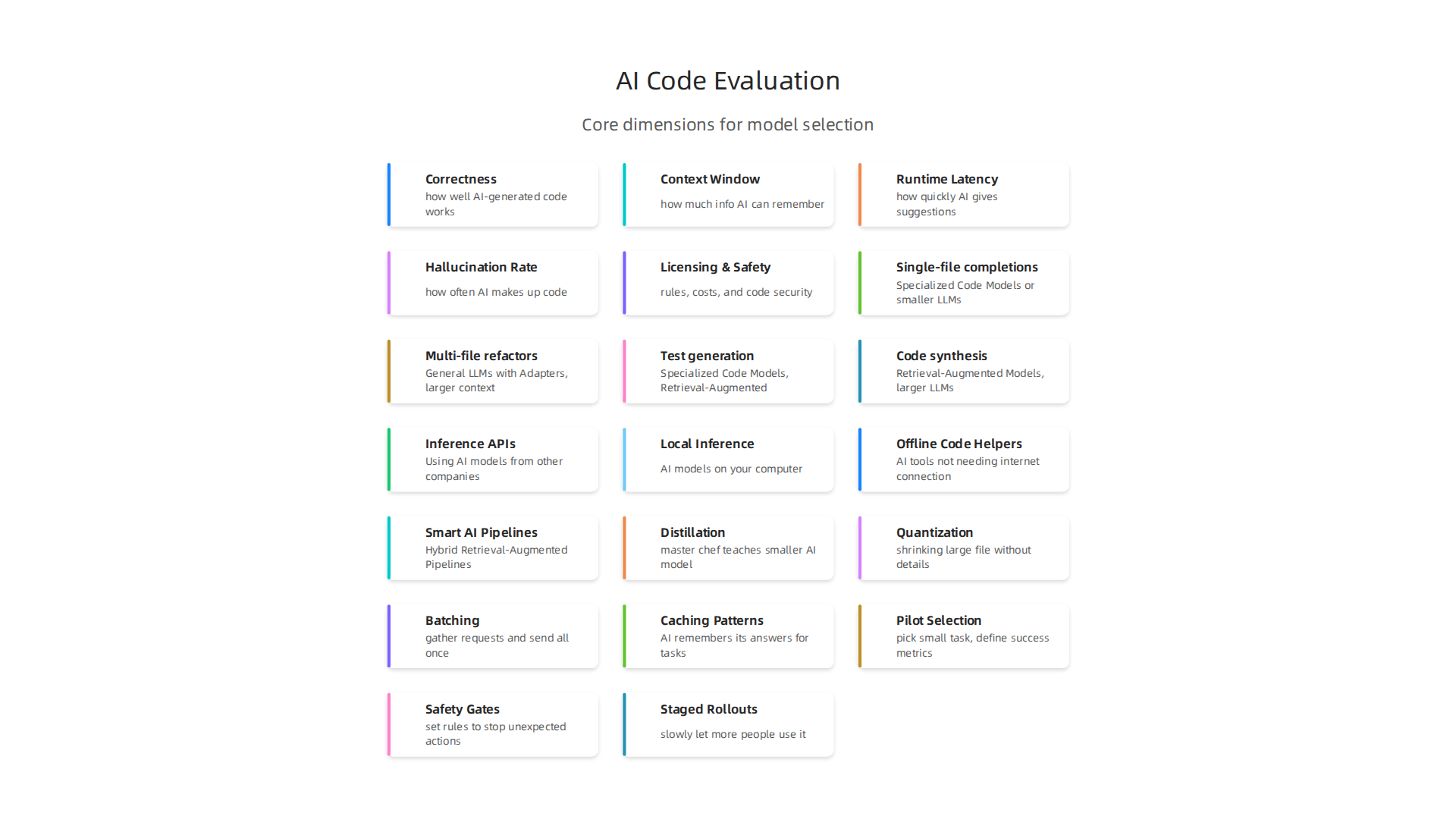
- Correctness: This is how well the AI-generated code works and if it has mistakes. We check this with special tests called benchmarks. For example, some models are tested on how well they can create Python code from descriptions, like the HumanEval benchmark. Models like Claude Opus and GPT-5 often show strong results in these tests Best LLM for Coding in 2026: Ranked by Real Benchmarks.
- Context Window: This means how much information the AI can remember and use at one time. A bigger "context window" lets the AI understand more of your entire project, leading to better code suggestions.
- Runtime Latency: How quickly does the AI give you its code suggestions? If you need fast answers, you’ll want a model with low latency. This is key for picking the best AI model for code when speed matters. To learn more about speeding up AI, you might find our guide on how to pick the fastest OpenAI model for low latency AI helpful.
- Hallucination Rate: This is about how often the AI "makes up" code that looks correct but actually does not work or is just plain wrong. A low hallucination rate is super important for reliable deep learning artificial intelligence tools.
- Licensing and Safety: Some AI models are "open source AI," meaning you can use them freely. Others have special rules or costs. Safety also looks at whether the code created is secure and free from harmful bugs.
How to Test AI Code
To truly know if an AI model is good, you need to test it properly. Here are some ways:
- Unit Tests: These are small, focused tests that check if tiny parts of the AI’s code work as they should. It’s like checking each gear in a machine separately.
- Static Analysis: This means looking at the code the AI wrote without actually running it. Tools can scan the code for common mistakes or bad styles, like a spell checker for code.
- Execution-Based Checks: This is when you run the AI’s code to see if it performs its job correctly. Benchmarks like LiveCodeBench test models on real coding problems to see how they perform in action AI Coding Benchmarks 2026: SWE-bench & LLM Scores.
- Human-in-the-Loop Validation: Even with all the automated tests, it’s very important for real people to review the code. A human developer can catch subtle errors, improve readability, and ensure the code fits the project’s goals. This human touch makes sure that deep learning artificial intelligence tools truly help us.
By using this framework, you can smartly compare different AI models and choose the one that works best for your specific coding projects.
To pick the best AI model for code, it helps to understand the different kinds of models available. Each type has its own strengths and works better for certain tasks. We’re in 2026, and the choices are richer than ever.
Different Kinds of AI Code Models
When you want to find the best AI model for code, you’ll see a few main types. Thinking about these can help you decide:
- Specialized Code Models: These AI models are built just for coding. They are trained on huge amounts of code and can be very good at specific programming tasks or languages. They often show top results in benchmarks for creating good code Best AI Code Generation Models Compared | March 2026 | CodeSOTA.
- General LLMs with Adapters: These are general-purpose AI models, like those used for writing text or answering questions, but with special add-ons or fine-tuning that makes them better at coding. They are good for a wider range of tasks.
- Retrieval-Augmented Models: Imagine an AI that can not only generate code but also look up information from your project’s documentation or helpful code examples. These models do just that, using outside knowledge to create more accurate and relevant code. This approach makes them highly effective deep learning artificial intelligence tools.
- Local vs. Cloud-Hosted Variants:
- Local Models: These run directly on your computer or company’s servers. They often include open source AI options, which give you more control over data and privacy. They can be a good choice for sensitive projects or when you want to customize the AI yourself.
- Cloud-Hosted Models: These run on powerful computers in the cloud. You access them over the internet. They are usually faster and can handle bigger tasks without you needing to worry about the computer power. Many of the top-ranked models for coding, like Claude Fable 5, are cloud-hosted Best AI for Coding 2026 – Top Coding Models.
Choosing the Right Model for Your Task
The best AI model for code really depends on what you need it to do. Here’s a quick guide:
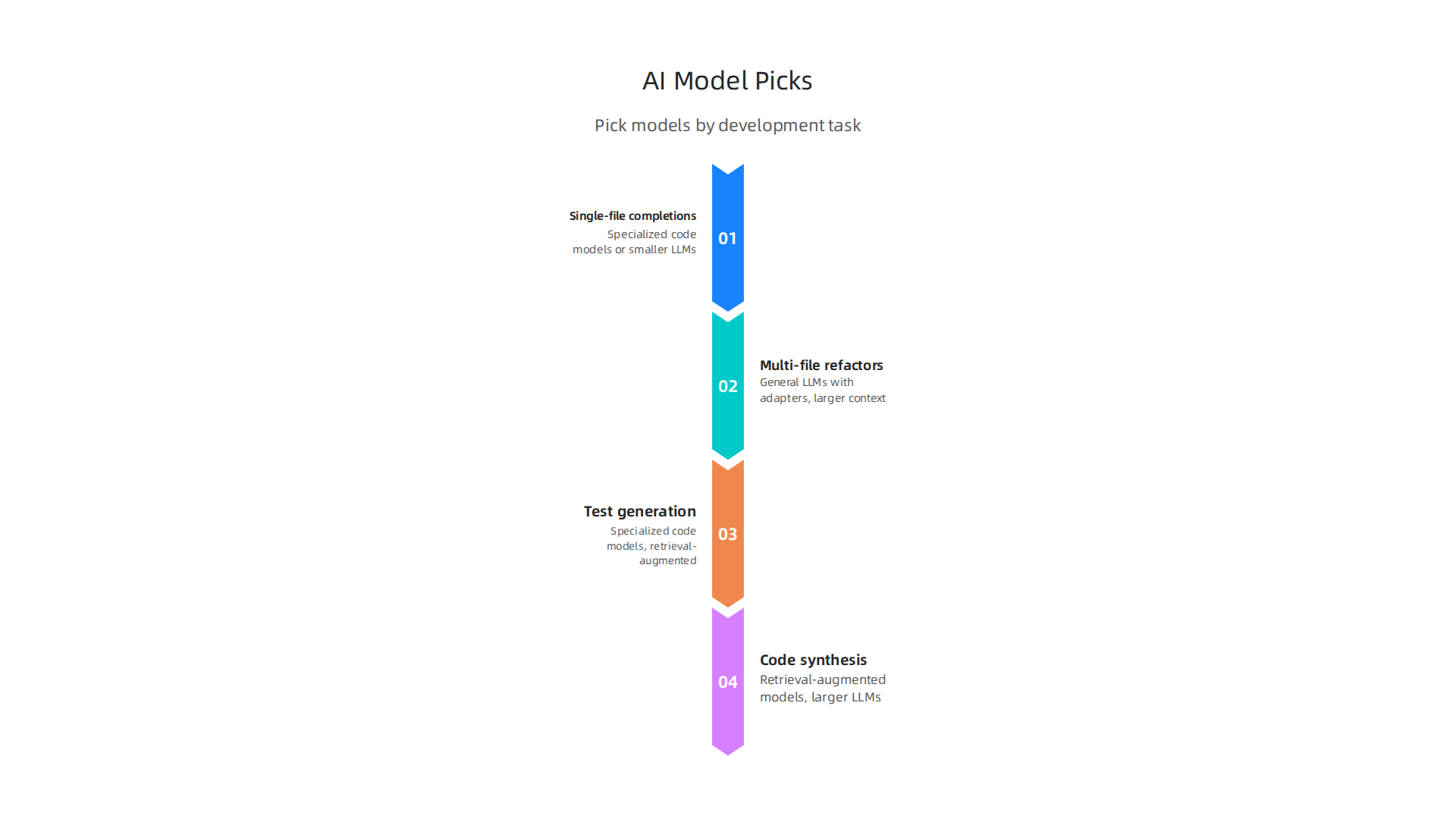
| Task Type | Best Model Type to Consider |
|---|---|
| Single-file completions | Specialized Code Models or smaller LLMs |
| Multi-file refactors | General LLMs with Adapters, larger context |
| Test generation | Specialized Code Models, Retrieval-Augmented |
| Code synthesis from specs | Retrieval-Augmented Models, larger LLMs |
For simple tasks like writing a single function, a specialized code model might be perfect. If you need to change a lot of files or create code from complex descriptions, a general AI model with strong coding abilities and a larger context window would be better. When you need the AI to learn from your existing code or documents, retrieval-augmented models shine. For those interested in improving their skills with these advanced tools, learning through an Unlock your AI potential choosing the right learning AI course for 2026 can be a great next step.
Staying updated on all the new developments in AI can be tough.
Get clear daily AI updates from The AI Newsletter Worth Reading.
After understanding the different types of AI code models, the next important step is to see how well they actually work. This means using benchmarks and watching how the models perform in real-world settings. Choosing the best AI model for code isn’t just about looking at a list; it’s about checking its real-world skills.
Benchmarks and Practical Evaluation: What to Run in Your CI
To truly know which AI model is best for your code, you need to test it. This often happens in something called Continuous Integration (CI). CI is where developers regularly merge their code, and automated tests run to check for errors. Adding AI model evaluations to your CI helps make sure the AI is always working well with your project.
Here are some practical tests to include in your CI setup for evaluating AI code models:
- Sample Unit Tests: These are small, quick tests that check individual parts of your code. An AI model should be able to write new unit tests for your functions or even fix existing ones when you make changes. Benchmarks like HumanEval and MBPP often use unit tests to check how well models create Python code Best LLM for Coding 2026 | AI Coding Model Rankings & Benchmarks.
- Integration Scenarios: These tests check how different parts of your code work together. For AI, this means seeing if the model can generate code that fits smoothly into your larger project and interacts correctly with other files. Models are often judged on how well they handle complex, real-world tasks found in things like SWE-bench AI Coding Benchmarks 2026: SWE-bench & LLM Scores.
- Runtime Instrumentation: This is about watching how the AI-generated code runs. Does it use too much memory? Is it slow? You can add tools to your CI pipeline to measure these things. An ideal AI should produce efficient code, not just correct code.
- Safety Checks: It’s super important that AI-generated code doesn’t create security holes or introduce bugs. Your CI should have tools that look for common safety issues, like insecure code patterns or potential data leaks. This helps keep your projects safe when using even the most powerful deep learning artificial intelligence.
Many different benchmarks exist to help you compare AI models. Some popular ones for code generation include LiveCodeBench, which tests models on various scenarios like code generation and self-repair Best generative AI models at the beginning of 2026. Checking out a tool that provides a good overview of different benchmarks can also be very helpful to decide on the best ai model for code for your needs.
Interpreting Results: Stable Baselines and What They Mean
Once you start running tests, you’ll get results. But what do those numbers tell you?

- Stable Baselines: A stable baseline means you know what a normal, good score looks like for your project’s code. When a new AI model is introduced or an existing one is updated, you compare its performance to this baseline. If a model consistently scores near the top on benchmarks like HumanEval+, it shows a strong baseline ability AI Code Generation Benchmarks 2026: Which Model Actually ….
- Statistical Significance: This sounds fancy, but it just means figuring out if a change in score is a real improvement or just a lucky guess. A small jump in score might not be important, but a big, consistent jump is a strong sign of a better model.
- Regressions vs. Expected Variance:
- Regressions: If an AI model suddenly starts performing much worse than its baseline, that’s a regression. It means something went wrong, and the model is no longer as good as it was. You’ll want to investigate why.
- Expected Variance: Sometimes, scores will go up and down a little bit. This is normal, like how a sports team might have slightly better or worse days even if they are still good. This "expected variance" is part of how AI models work. You learn to recognize what normal ups and downs look like.
Keeping an eye on these tests helps you pick and maintain the best ai model for code for your team. If you’re looking to dive deeper into how these evaluations work and even design your own, there are many resources available to help you explore different ways to understand the performance of artificial intelligence models. For example, learning about different AI data analytics 2026 trends that deliver real results can give you a clearer picture of how to interpret complex AI performance data.
After seeing how well AI models work, the next step is to actually use them in your daily coding tasks. This means putting them into your development flow and making sure they play nice with your Continuous Integration (CI) and Continuous Delivery (CD) systems. It’s not enough to know which is the best AI model for code; you need to know how to deploy it safely and smoothly.
Integrating Models into Developer Workflows and CI/CD
Bringing AI models into how developers work means picking the right way to use them. Here are some common ways to set up AI for coding:
- Using AI Models from Other Companies (Inference APIs): This is like using a service where someone else runs the AI model for you. You send your code or a request, and the AI sends back its ideas. This can be very fast and easy to set up. But you need to think about the cost and how quickly you get a response. For example, some services offer very fast and affordable model serving in 2026. If you want to dive deeper into how different providers compare, you can learn more about how to pick the fastest OpenAI model for low-latency AI.
- Running AI Models on Your Own Computer (Local Inference): Sometimes, you might want to run the AI model directly on your own machines. This gives you more control and can be better for privacy, especially if you’re using an open source AI model. However, you’ll need strong computers to handle the deep learning artificial intelligence. Knowing the differences between open-source versus commercial LLMs can help you decide if this is the right path.
- Offline Code Helpers: These are AI tools that don’t need to be connected to the internet all the time. They are great for developers who work in places with slow internet or who have very strict security rules.
- Smart AI Pipelines (Hybrid Retrieval-Augmented Pipelines): Imagine the AI model has a huge brain, but you also give it a library of all your company’s secret coding knowledge. This is what hybrid Retrieval-Augmented Generation (RAG) pipelines do. They help the AI use its general knowledge plus your specific project details to give even better suggestions, making it truly the best AI model for code for your specific needs.
Keeping Things Safe, Predictable, and Updated
When you use AI for code, you need to make sure it’s always working correctly and doesn’t cause new problems.
- Model Pinning: Think of this as "freezing" the version of an AI model you are using. Just like you might use a specific version of a software library, you "pin" your AI model to a certain version. This means you won’t be surprised by sudden changes in how the AI works, which helps with safety and consistency.
- Reproducible Prompts: These are the clear instructions you give to the AI. Making sure these instructions are always exactly the same helps the AI give you similar results every time. It’s about being very clear in your communication with the AI.
- Test-Driven Model Updates: When a new version of your chosen AI model comes out, you don’t just switch to it. Instead, you run all your special tests first. This checks if the new model is still as good as the old one, or even better, and doesn’t break anything. It’s a key part of making sure your deep learning artificial intelligence tools are always helping, not hurting.
Learning about how to build and manage these advanced AI systems can be tricky. Many people find that taking an AI Agents in 2026: Build, Deploy, and Scale (Full Guide) can greatly improve their skills. If you’re looking to boost your knowledge, consider finding an AI agent course that helps you build reliable AI workflows.
Keeping up with all the new AI models and ways to use them can feel like a lot.
Get clear daily AI updates from The AI Newsletter Worth Reading.
Keeping up with all the new AI models and ways to use them can feel like a lot.
Choosing the right AI model for code isn’t just about how smart it is. It’s also about how well it works in real-life coding tasks, considering things like speed and cost. This means looking at different trade-offs to find the best AI model for code that fits your team’s needs.
Cost, Latency and Trade-offs: Choosing Models for Production
When picking an AI model for your company, you need to think about a few key things. It’s like choosing a car: a fast sports car is great, but a bigger, slower truck might be better for carrying heavy loads.
-
Model Size vs. Speed (Latency): Bigger AI models are often very smart and can understand complex tasks well. But they can also be slower to give an answer. Smaller models, on the other hand, are usually faster, but might not be as good at very tricky problems. You can see how different models compare in terms of speed in a 2026 LLM Inference Latency Benchmark. Finding the right balance here means deciding if you need super-smart AI that takes a moment, or quick AI that’s good enough.
-
Cost Per Use vs. Developer Time Saved: Every time an AI model helps with code, it costs a little bit of money. This cost can change a lot between different services. You can compare these costs with a 2026 LLM API Pricing Comparison. Sometimes, paying a bit more for a really good AI that saves your developers many hours of work is cheaper in the long run. Other times, a cheaper option, like an open source AI model, might work if it still makes developers much faster. It’s all about how much value the AI adds for the money you spend.
-
Running AI on Your Own vs. Using a Cloud Service: You can run AI models on your own computers (on-premise) or use services from big companies like Google or Amazon (managed services). Running it yourself gives you full control and can be cheaper if you use it a lot, but you need to manage all the hardware. Cloud services are easier because someone else handles the hard parts, but costs can add up. Understanding these differences is key for making smart choices about enterprise AI tooling in 2026.
Smart Ways to Make AI Models Work Better
Once you’ve picked your model, there are clever ways to make your deep learning artificial intelligence even more efficient and affordable. These are called optimization strategies:
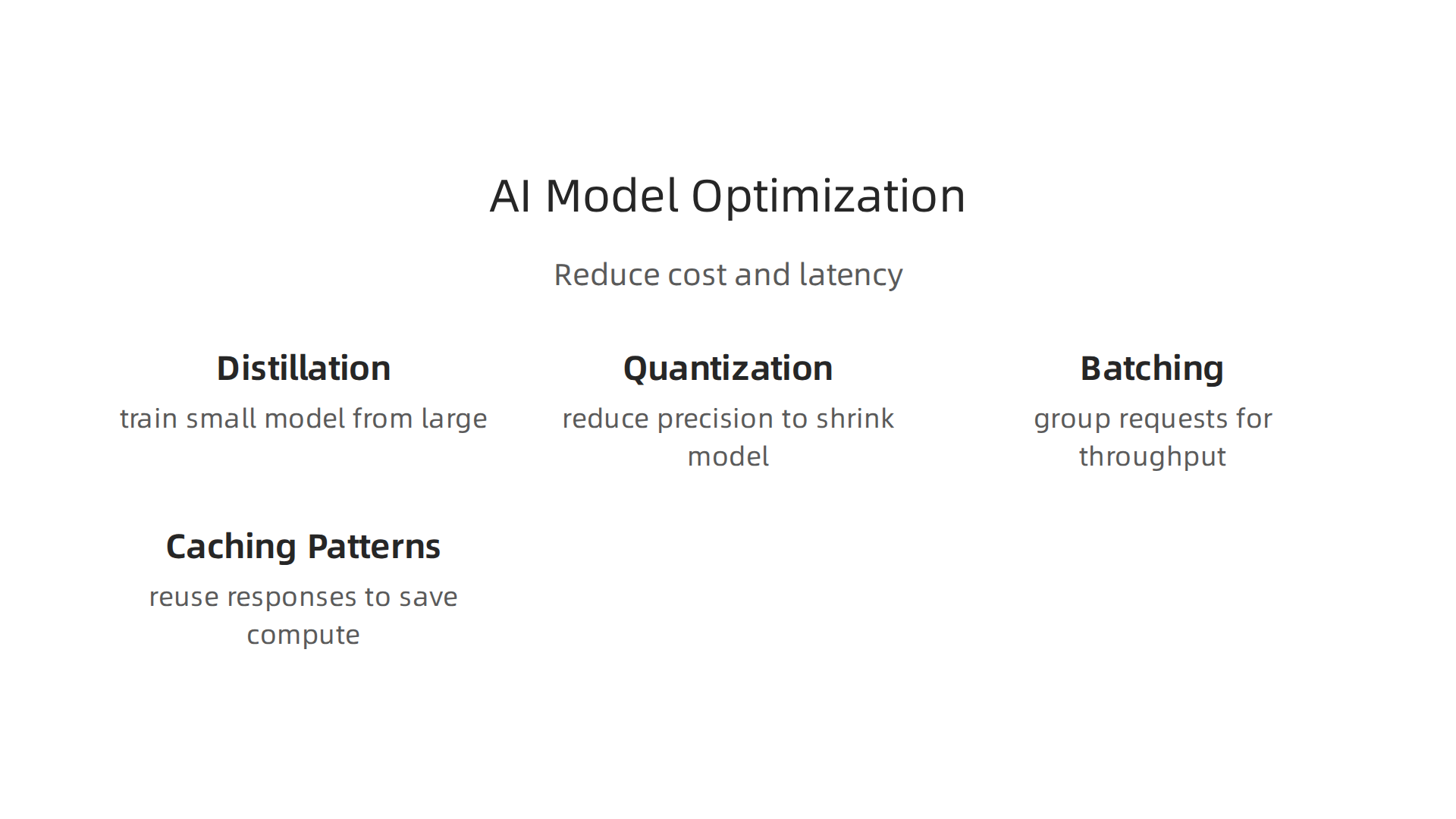
- Distillation: Imagine a master chef (a big AI model) teaching a new chef (a smaller AI model) all the best recipes. The smaller chef learns to cook almost as well but much faster. This makes the AI quicker without losing too much quality.
- Quantization: This is like shrinking a large file without losing important details. AI models use complex numbers, and quantization makes these numbers simpler, so the model takes up less space and runs faster on computers. This can cut cost and latency significantly.
- Batching: Instead of sending one request to the AI at a time, you gather a bunch of requests and send them all at once. This helps the AI work more efficiently, like a delivery truck carrying many packages on one trip instead of many small trips.
- Caching Patterns: For tasks that come up often, the AI can remember its answers. If it sees the same question again, it just pulls up the old answer instead of figuring it out all over again. This saves a lot of time and computing power.
Making AI models smarter and more efficient is a big win, but who makes these new tools and strategies? Engineers are needed more than ever to build and manage the latest AI helpers, known as AI agents. To do this, they need to learn new skills. This means finding the right AI agents course or upskilling path.

Agent courses and upskilling paths for engineers
As artificial intelligence grows, engineers need to keep learning to work with advanced systems like AI agents. These agents can do many steps on their own, making them very powerful. To truly master working with the best ai model for code, engineers need to gain new knowledge.
Here’s what engineers need to learn to build and use AI agents in 2026:
- Prompt Engineering: This is about knowing how to talk to an AI model to get the best results. It means writing clear instructions so the AI understands what you want it to do. Many courses focus on this important skill, as seen in the CS 8001 OAA Syllabus.
- Grounding using Retrieval: AI agents need to use real-world information to make good decisions. This skill teaches engineers how to help the AI find and use the right facts, instead of just guessing.
- Building Stateful Agents: Imagine an AI that remembers what happened before. Stateful agents can keep track of past actions and information, making them much smarter in long conversations or complex tasks. Learning about designing autonomous systems is a key part of an Agentic AI syllabus.
- Safe Execution Environments: When AI agents can act on their own, it’s super important to make sure they do so safely. Engineers learn how to set up rules and checks so the AI doesn’t do anything unexpected or harmful. This includes understanding production safety and guardrails, as taught in courses like Building AI Agents.
You might be wondering where engineers can learn these important skills. There are many ways to get an ai agents course today:
- Hands-on Bootcamps: These are often short, intense programs that teach practical skills. They are great for quickly getting up to speed on building AI agents.
- University Modules: Many colleges offer special classes focused on deep learning artificial intelligence and AI agents. For instance, the AI Agents & Workflow Automation Syllabus outlines a program designed for practical application.
- Company Internal Training: Some larger companies create their own training programs to help their engineering teams learn specific skills needed for their projects, whether they involve proprietary or open source AI models.
By taking an ai agent course, engineers can ensure they are ready for the future of coding and AI. If you’re looking to enhance your AI knowledge, there’s a huge variety of programs available to help you unlock your AI potential.
Want to stay informed about the rapidly changing world of AI?
The AI Newsletter Worth Reading
Once engineers have learned how to work with AI agents, the next big step is putting these tools into action for real work. It’s not just about building them, but also about making sure they work well and safely in a company setting. This takes a clear plan, moving from small tests to full use.
Implementation roadmap: pilot to production for developer teams
Bringing AI agents into a company’s daily work needs a careful step-by-step approach. This roadmap helps developer teams make sure their AI agents are useful and reliable, whether they are using a special best ai model for code or another kind of artificial intelligence.
Step-by-step plan for AI agent deployment
Here’s how teams can move from testing to using AI agents widely:
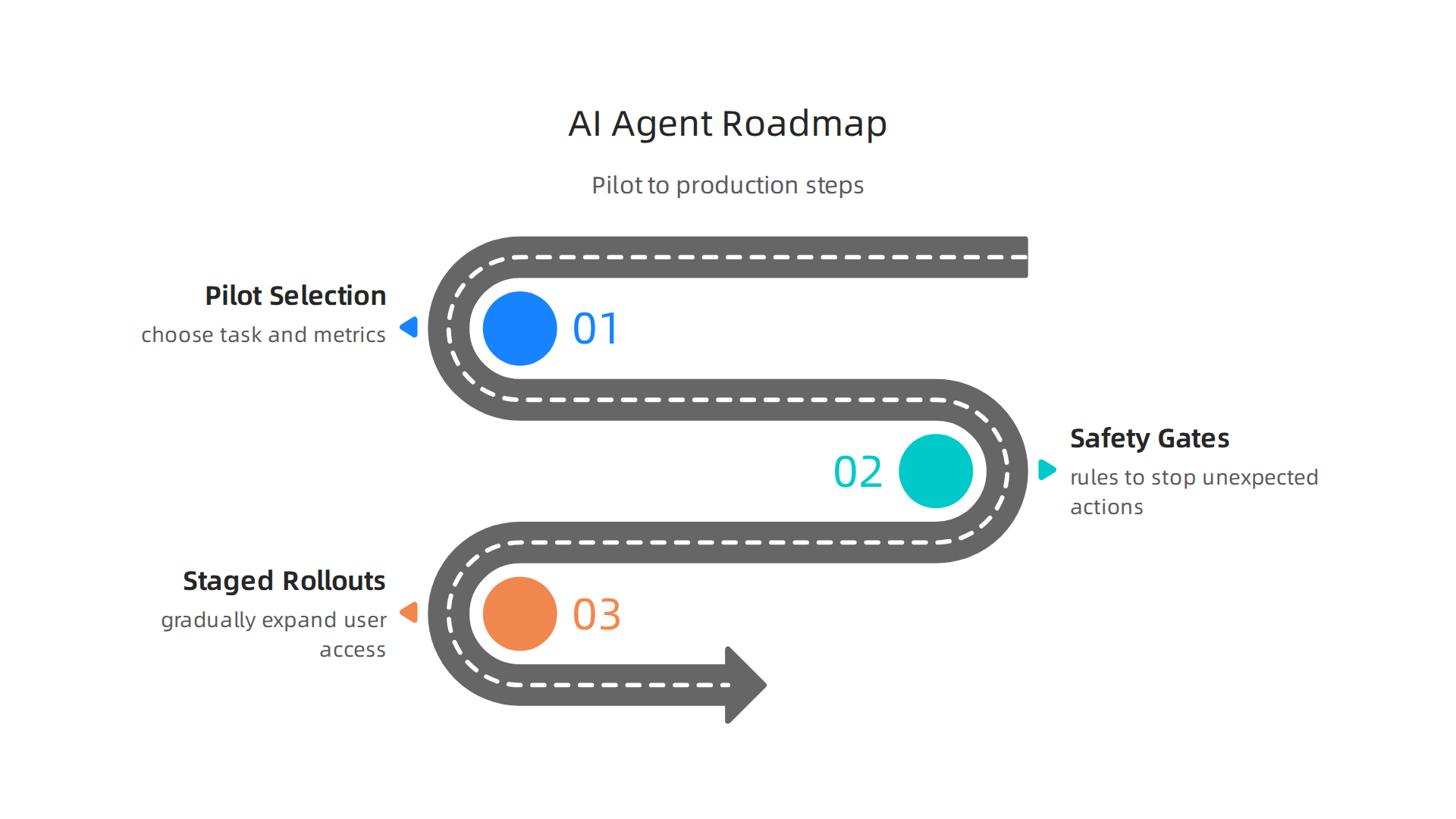
- Pilot Selection and Success Metrics: First, pick a small, clear task where an AI agent can really help. It’s like a test run. For example, you might try to automate a simple part of coding. Before starting, decide how you will know if the agent is successful. This could be by measuring how much faster the task gets done or if there are fewer mistakes. Without clear goals, it’s hard to tell if the pilot works, as highlighted in the Agentic AI Implementation Guide 2026: From Pilot to Production.
- Safety Gates and Guardrails: When AI agents start doing things on their own, safety is super important. Engineers must set up "safety gates" to stop the agent if it tries to do something unexpected or wrong. This means having checks in place before any code or action is finalized. Teams need to carefully think about rules and approvals to prevent problems. Learning about production safety is something covered in many an AI agents course.
- Staged Rollouts to Scale: After a successful pilot, don’t just turn the AI agent on for everyone at once. Instead, slowly let more people or systems use it. This is called a staged rollout. You might start with one team, then move to a few teams, and so on. This way, if problems pop up, they can be fixed before they affect too many users. This careful approach helps scale up agents safely and effectively, as explained in guides on Scaling AI Agents in Engineering: From Pilot to Production.
Organizational checklist for sustaining AI agents
Beyond the technical steps, companies also need to think about how their teams will work with AI agents every day:
- Clear Roles and Responsibilities: Everyone needs to know their part. Who is in charge of checking the agent’s work? Who fixes it if it breaks? Who updates the underlying deep learning artificial intelligence models? Defining these roles early makes everything run smoothly. This is a core part of an Agentic Engineering Operating Model.
- Monitoring and Logging: Teams need good ways to watch how AI agents are performing. Are they making mistakes? Are they fast enough? Monitoring tools help catch issues quickly. Logging means keeping a record of what the agent does, which is helpful for finding out why something went wrong. This ties into overall ops technology for AI professionals.
- Ongoing Developer Training: Just because engineers took an ai agent course does not mean learning stops. As AI technology, including open source AI, changes, developers need to keep learning. Regular training ensures that teams can adapt, improve their agents, and handle new challenges that come with using advanced AI systems.
Summary
This article explains how to choose the best AI model for writing and maintaining code in 2026 by giving a practical, test-driven framework. It walks through the core evaluation dimensions—correctness, context window, latency, hallucination rate, and licensing—and shows how to validate models with unit tests, static analysis, execution checks and human review. You’ll learn the main model types (specialized code models, general LLMs with adapters, retrieval-augmented, local vs cloud), which types suit different tasks, and what to run automatically in CI to track real-world performance. The guide also covers deployment concerns: pinning models, reproducible prompts, staged rollouts, and safety guardrails, plus cost/latency trade-offs and optimization tricks like distillation and quantization. Finally, it recommends upskilling paths and a step-by-step pilot-to-production roadmap so teams can safely scale AI agents and measure impact in production.